Limpido
Clear Streaming
One calm, native app for your IPTV line: M3U / Xtream / Stalker, EPG guide, catch-up TV, recordings, multi-view — with a native app for Android TV.
Windows, Linux, Android, iPhone and iPad. Seven days free, no card required.


17 MB
On iPhone, engine included
~1 s
Channel start
0
Bundled decoders on iPhone
FIPS 204
PQ signatures
We ship an engine, not a wrapper.
Players this small are usually a shell around a web view. Players this capable usually bundle a 50 MB copy of ffmpeg. On iPhone — the hardest platform — Limpido is neither: a Rust core reads the stream itself and hands compressed frames straight to the hardware decoder, and the whole app is 17 MB. On every other platform we tell you exactly what ships and why, in the table below. Ask any other player for the same table.
Its own demuxers
MPEG-TS and Matroska are read in Rust, not by a bundled library. Live TV plays on an iPhone with zero decoders on board, and so do .mkv films — with their audio languages and subtitles, and offline once downloaded.
Straight to silicon
Compressed samples go directly to the hardware: AVSampleBufferDisplayLayer on Apple, Media3 on Android, libmpv on desktop. Channels start in about a second.
Playback that heals itself
Lip-sync is measured every two seconds and corrected on a graduated ladder. Frozen or silent streams fail fast — and anything that goes wrong falls back to the system player, automatically, per title.
The formats panels actually use
HLS, MPEG-TS, MKV, MP4, DASH with ClearKey. M3U, Xtream and Stalker portals — films and series included, not live TV only. HEVC repackaged on the fly where the system refuses it. Catch-up, four multi-view shapes and a connection budget that respects your line.
Every platform, declared
Real numbers from the builds we actually ship — because trust is a table, not a slogan.
| Platform | Who reads the stream | Who decodes | Download |
|---|---|---|---|
| iPhone & iPad | Limpido (Rust) | Apple’s silicon, directly | 17 MB |
| Android | Limpido’s transport road + Google’s Media3 | The phone’s hardware codecs | 55 MB — 64- and 32-bit ARM in one file |
| Android TV & Fire TV | Limpido (Rust), the same core | The panel’s hardware codecs, through Media3 | 25 MB — its own app, not the phone build |
| Windows | mpv, bundled on purpose | Your GPU, through mpv | 71 MB (.msi) |
| Linux | mpv, bundled on purpose | Your GPU, through mpv | 66 MB (.deb) · 219 MB (AppImage) |
Why mpv on desktop: there is no hardware decoding API you can trust across every PC and distro, and mpv is the best open engine alive — so we ship it, say so, and pay the megabytes honestly. The phone APK carries builds for 64- and 32-bit ARM in one file; your device installs only its own. The television gets a separate application instead — a native interface for a remote control, and 25 MB because it needs no WebView.
IPTV player
Your playlists, finally treated with respect.
Four things a player has to get right before any of the rest matters. Limpido gets all four right on a phone, a tablet and a television.


- 01
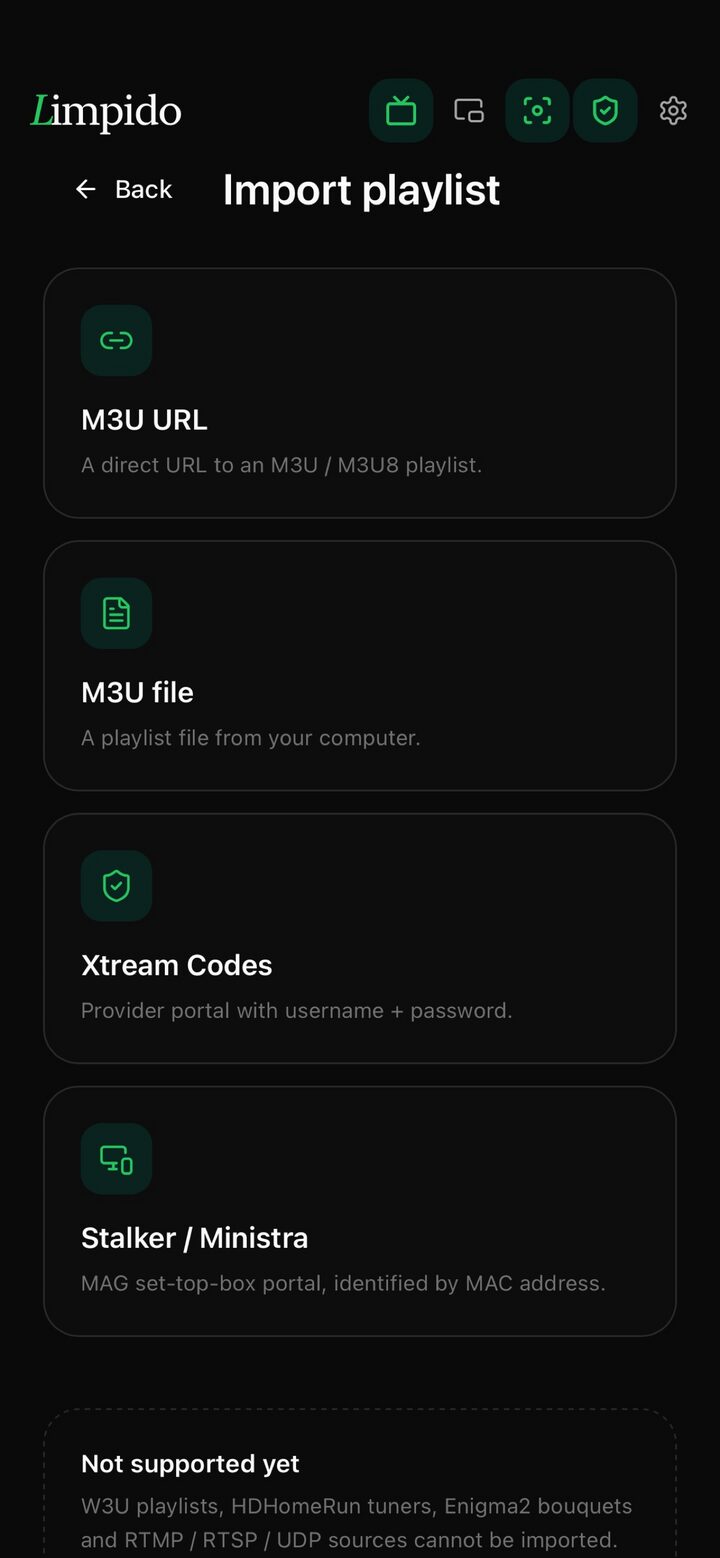
Bring your own playlist
An M3U address, an M3U file, or an Xtream Codes account. Credentials are encrypted at rest with AES-256-GCM, and a list of two hundred thousand channels opens without complaint.
- 02
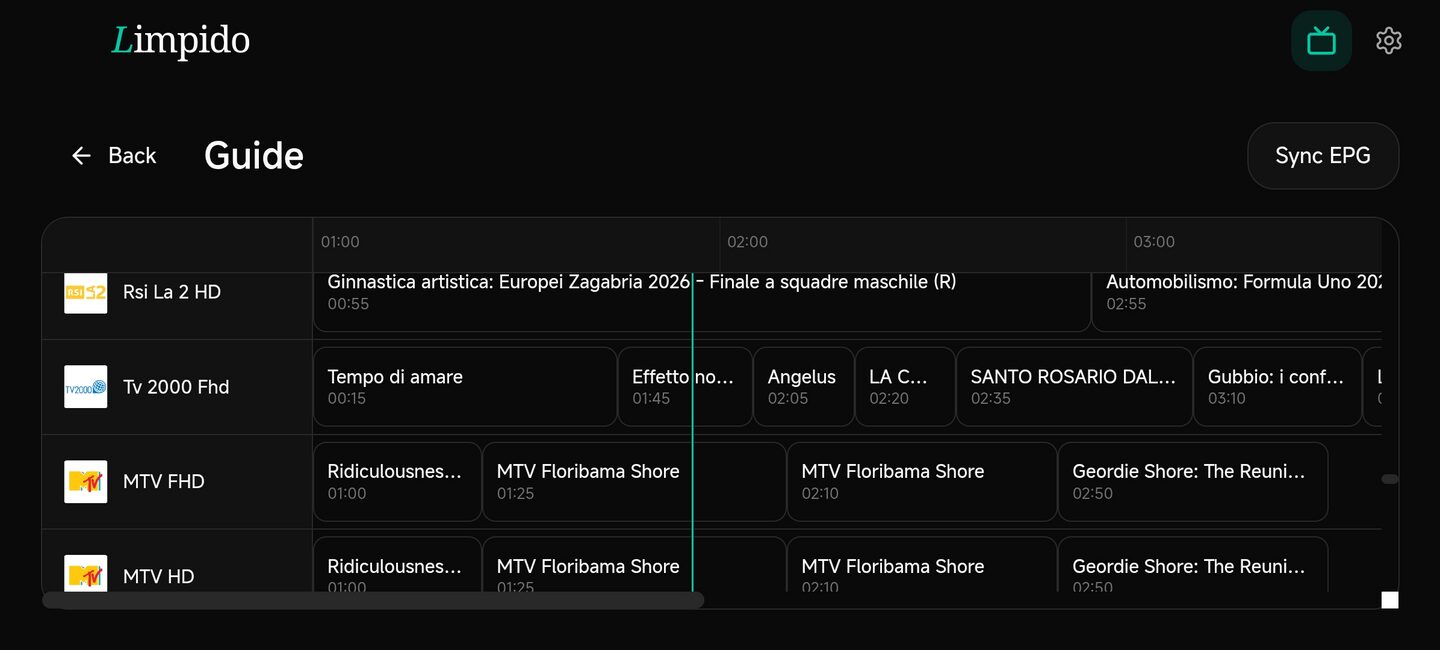
A guide that knows what time it is
The XMLTV guide refreshes every six hours in the background. Open it and the grid is already on the current hour — tap a programme to jump straight to it.
- 03
Go back in time
Xtream, Stalker and Ministra portals, and any playlist that declares an archive. Jump back an hour, three, six, a day — or pick the exact moment out of the guide, and Limpido pulls the recording.
- 04
Even with no line at all
Keep films and episodes from your own subscription on the device. For the plane, the metro, or a connection that comes and goes — they play in airplane mode.
Stream health + recent
A coloured dot on every row tells you which channels worked the last three times you tried them. A Recent tab brings back the last 50 you watched.
Android TV, native
A television app in its own right: an interface built for the remote, hardware decoding, leanback launcher — and sign-in without typing, a code on the screen approved from your phone. Sideload the APK on any Android 8+ device: Chromecast Google TV, Sony Bravia, Mi Box, phones and tablets too.
Limpido is a player. You bring the playlist. We do not host, distribute, or proxy third-party content.
Multi-view
Four at once. The sound follows your eyes.
Point at a tile and it takes the audio; the other three fall silent. That is not a website trick — it is exactly what the app does when you pick a cell with a click or with the remote. Try it. The app offers four shapes, up to nine tiles; this is the classic one.
The actual screen, recorded — free 24/7 channels, the line badge, and a slot swapping live. Nothing staged.
Live has the audio
It ends up on the biggest screen anyway.
IPTV lives on the television. Limpido now runs on Android TV as a native app — its own remote-first interface, frames decoded in hardware, the same Rust core you read about above driving that screen. Pair it from your phone: a code on the television, six digits to compare, and your library walks onto the biggest screen by itself.
Limpido on the television — the same app, the same library, the biggest seat in the house.
Library sync
Set it up once. It follows you everywhere.
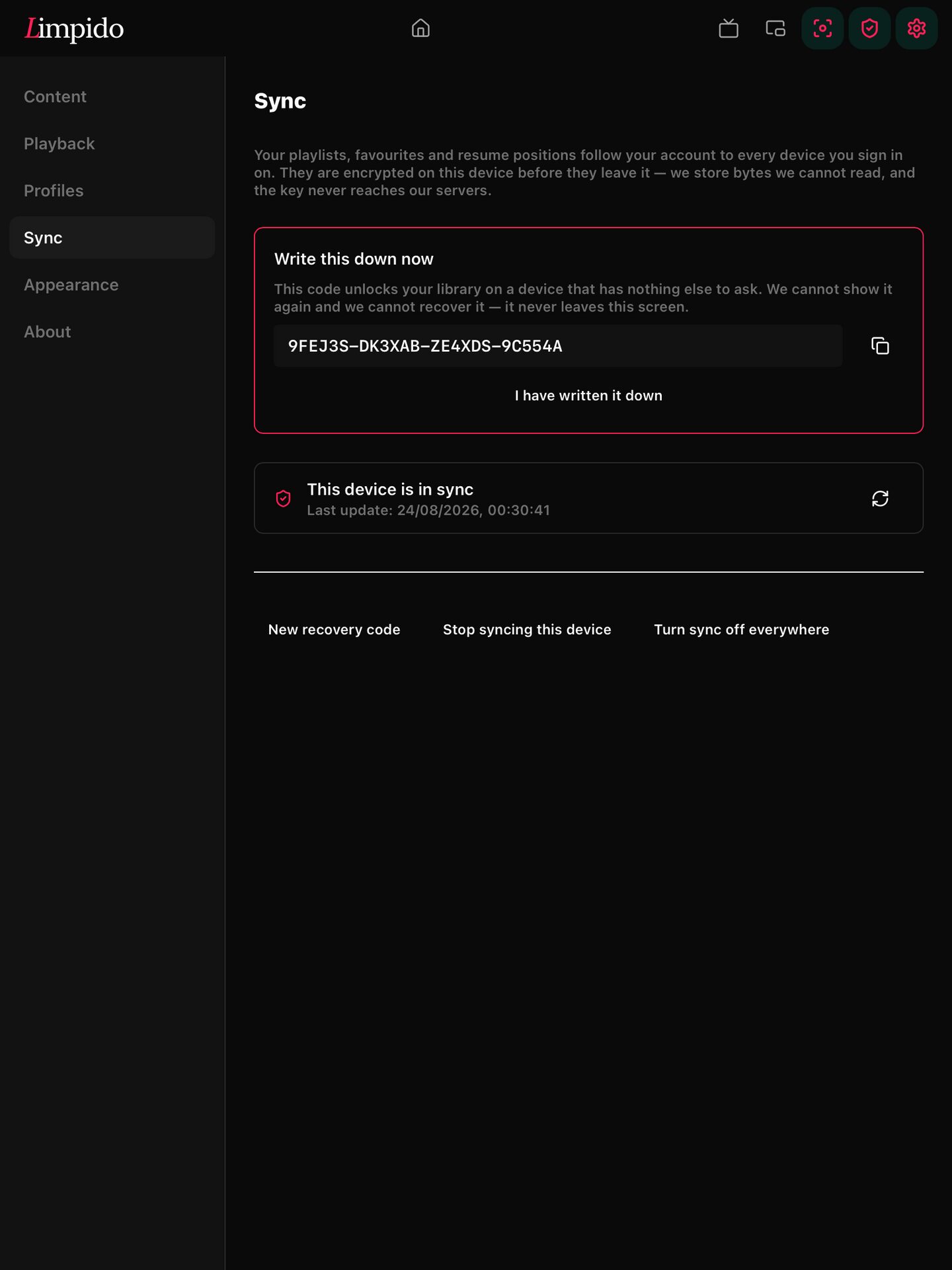
Your playlists, your favourites, and the exact second you stopped watching — on every device you sign in from, encrypted so thoroughly that we could not read them if we wanted to.

- 01
Off until you turn it on
Nothing leaves the device until you ask it to. Turning it off again, or deleting your account, deletes what we hold.
- 02
One device lets the next one in
A new device is admitted from one you already use: six digits to compare on both screens, and the library arrives. The television included — paired from the phone, no password typed with the arrows. The key never reaches our servers: no escrow, no recovery path on our side.
- 03
Pick up exactly where you stopped
Pause an episode on the phone, open the tablet, and it is waiting at the same second. What we store is bytes we cannot read.
Encrypted on your device before it leaves it — what we store is bytes we cannot read.
The key never reaches our servers. No administrative procedure, no escrow, no recovery path on our side.
A new device is let in from one you already use: six digits to compare, and the library arrives.
Pause an episode on the phone, finish it on the computer.
Off until you turn it on. Turning it off, or deleting your account, deletes what we hold.
One app, every screen you own
Windows
10 and 11 · x64
Linux
AppImage and .deb · x64
Android
Phone, tablet and TV — native TV app · 8.0 and later
iPhone & iPad
Its own playback engine — frames go straight to the hardware decoder
macOS is on the way. Your library follows you across all of them.
Three steps. Zero friction.
Limpido is built for the moment you sit down and want to watch something — not configure it.
- 01
Open Limpido
Cold-start in under a second. The chrome stays out of your way: a slim sidebar, a draggable window, and your video front-and-centre.
- 02
Pick your stream
Paste a link, browse a profile, or jump to a saved favourite. Multi-profile keeps your work and personal sessions completely separate.
- 03
Watch in peace
Native playback, no overlays, no popups, no surprises. Toggle focus mode, dock to PiP, or send to background audio at any time.
Everything you need, nothing you don't
Built from scratch in Rust + Svelte. No Electron. No telemetry. Every feature is native, fast, and stays out of your way.
Recordings
Record what is on until it ends, a programme from the guide, or every episode of a show. Saved as HLS, so you can scrub it — even while it is still recording.
Pause live TV
Pause a channel and pick up where you stopped, up to two hours back.
Offline downloads
Films, episodes and archived programmes, for the plane or the metro. A series is one row with its seasons inside, not sixty files.
Native playback
Our own engine demuxes; your hardware decodes. Smooth 4K at a fraction of the CPU.
Lightweight
17 MB on iPhone, engine included. Cold start in under a second. No Electron, no Flutter, no bundled ffmpeg.
The whole guide
Every XMLTV field — episode, season, categories, artwork — extra guide sources per playlist with a time offset, and the guides of Stalker portals too.
Picture-in-picture
Keep the channel floating above everything else while you do something else.
Post-quantum security
Every signature and key exchange uses hybrid Ed25519 + ML-DSA-65 / ML-KEM-768. Future-proof by design.
Security that outlives today's threats
Every license, every update, every key exchange uses hybrid classical + post-quantum cryptography. Ed25519 paired with ML-DSA-65 (FIPS 204) for signatures. X25519 paired with ML-KEM-768 for key agreement.
Dual-signed licenses (Ed25519 + ML-DSA-65)
Dual-signed updates with rollback protection
Application-layer hybrid encryption over TLS
Device-bound keys via OS keystore + Argon2id
End-to-end encrypted library sync
Constant-time verification everywhere
Anti-tamper: the app verifies its own binary at start
Signed kill-switch with anti-replay — even an emergency cannot be forged
Open-source content-script (MIT)
Measured against the usual IPTV players.
The honest scorecard — including the places where the incumbents still lead, and what we are doing about them.
| Limpido | The usual players | |
|---|---|---|
| Playback engine | Its own — Rust demuxes, your hardware decodes | A wrapper around the system player |
| iPhone & iPad | Its own sample-level engine — live TV, and .mkv films with their audio languages and subtitles | Absent, or an old wrapper with a dated interface |
| Windows & Linux | Native apps, same library | Nothing — a VLC window and good luck |
| Library sync | End-to-end encrypted; we cannot read it | A server that stores your playlists in the clear, or nothing |
| A channel that freezes | Plays on, from another listing of the same channel | You notice, and you change it yourself |
| Whose guide is whose | Correct a wrong one once; the fix follows you to your other devices | Fix it again on every device, if you can fix it at all |
| Children | Their own profile, filtered by rating, locked by a PIN worth the name | A PIN over the adult folder, and a digest of it on disk |
| Security | Signed updates, anti-tamper, post-quantum signatures | Not part of the conversation |
| App size | 17 MB with the engine inside | 50–80 MB of bundled decoders |
| Television remote-first UI | A native TV app on the same Rust core — remote-first, hardware decoding, recordings, pause live TV, a full guide, paired in from the phone | Their home turf, and years of polish |
| Recordings (DVR) | Record until it ends, from the guide, or every episode of a show — and pause live TV | Available, usually behind their premium tier |
| Offline downloads | Films, episodes and archived programmes, on iPhone too — a series is one row with its seasons | Often missing, or a flat list of files |
Comparison with the popular IPTV players of 2026, unnamed on purpose: their features move, ours are verifiable in the app you can download for free below.
Simple, honest pricing
Seven days free, everything unlocked. No nags, no dark patterns. Upgrade when you're ready.
Free
Every feature unlocked. No card required.
€0 7-day trial
- Distraction-free player
- IPTV player (M3U + Xtream + Stalker)
- EPG guide + catch-up TV
- Multi-view, four shapes
Lifetime
Pay once. Every feature, every future version.
€19.99 one-time
- Everything in Free
- IPTV player (M3U + Xtream + Stalker + EPG + catch-up)
- Multi-view layouts, up to nine tiles
- Library sync across your devices
- Background EPG auto-sync
- Android TV + Phone APK (sideload)
- Custom themes + multi-profile
- Every future version, v2 included
- 6 device activations
- Priority email support
Pro
Every Lifetime feature, from €0.99 a month.
€0.99 /month
- Every Lifetime feature
- 3 device activations
- Monthly or yearly, cancel any time
For sellers
The reseller program is open
Prepaid credits, single-use codes, signed device-bound licences — and a panel that asks for your six digits on every movement.
- Two factors on every code generation
- Full refund on unsold codes
- None of your customers’ data in the panel
Ready to reclaim your screen?
Download Limpido for free. Seven days on us, no telemetry, no strings attached.
Download for free